Sunday, February 23, 2020

Week 6- Coding

What are the compelling arguments both for and against computer coding in schools?
At least 1 listed resources and 1 other

This week we focused on the arguments for and against computer coding in schools. I don't have very much personal experience with coding being used in classrooms. My only experience is with Ozobots and in a very limited setting. I honestly was not very familiar with the technology so I wasn't the best person to be able to teach the kids the full scope of what Ozobot has to offer.


As I explored more about coding in education I learned a lot! According to an article by Liana Louwus (2015), an elementary school in Pheonix Arizona implemented a computer programming class in K-8 classes. I think this is wonderful but my first thought is where does the money come from to pay for a program like this. 

According to Matt Harrell, "computer science drives innovation in the U.S. economy society. Despite the growing demand for jobs in the field, it remains marginalized throughout the U.S. K-12 education system" (2015). Taking this into account this article focuses on the idea that with computer science being such an important field we need young people who are ready to work in computer science sector. One way to do this is to start them with coding and exploring computers early. The best time to start is when they are young and in early elementary school. 

There are many benefits for building computer skills in children including:
-Logical thinking
-Problem-solving
-Persistence
-Collaboration
-Communication

For this blog post, I also explored varying opinions when it came to teaching kids to code. An idea I found a lot was kids shouldn't be forced into computer science, there many be some who are not interested in it and by forcing them into something they don't want to do we are doing them a diservice. An article written by Michael Kasier-Nyman. I agree with this thought, but I think it is important to expose kids to a lot of different things to find out what they like. 

To get an idea of how coding can be used in the classroom I explored Tynker.com
This website is focused on different games that give kids a chance to practice their coding skills. It has games for kids grade Kindergarten to Sixth grade and older. The games range from ones about animals, space, cars, creating cities, birds. What I also like is that teachers can create a classroom and track students' progress. 
Ozobots- It's Your Move. (2015, March 31). Retrieved February 23, 2020,  https://Ozobot- It's Your Move. (2015, March 31). Retrieved February 23, 2020, from https://www.youtube.com/watch?v=zm_H8HXWFZ4

Loewus, L. (2015, August 27). Coding for Elementary Students: A Growing Trend?. Retrieved February23,2020,fromhttp://blogs.edweek.org/edweek/curriculum/2015/08/coding_for_elementary_students_a_growing_trend.html


Kaiser-Nyman, M. (2015, December 18). Why we Shouldn't Make Kids Learn to Code. Retrieved February 23, 2020, from https://www.epicodus.com/blog/dont-make-kids-learn-to-code


(n.d.). Retrieved February 23, 2020, from https://www.tynker.com/hour-of-code/teacher

Sunday, February 16, 2020

Week 5- Internet of Things

Design an object that could be classified as belonging to "The Internet of Things" and describe how it could contribute to your classroom?

This week lets start with a definition of what is the internet of things. According to Kobie (2015) the internet of things is about connecting devices over the internet, letting them talk to us, applications, and each other. An example of a device that falls into the internet of things category is a smart fridge.

According to Matthew Lynch, there are many examples of the Internet of Things including wearable devices, personalized learning, personalized learning, report automation, smart classrooms, and remote learning (Lynch 2019).

The object I designed this week is a tablet that allows students to have personalized learning. The tablets will be equipped with software that allows teachers to input data and creates personalized lessons and tests to meet each students unique needs. The tablets also let teachers stay informed with the students learning and see where they might be struggling.

Image result for Smart fridge


Internet of Things 101: Inside the Learning Trend in Higher Education. (n.d.). Retrieved February 16, 2020, from https://www.forbes.com/video/4066055740001/#2ec3632c1b7d

Kobie, N. (2015, May 6). What is the internet of things. Retrieved February 16, 2020, from https://www.theguardian.com/technology/2015/may/06/what-is-the-internet-of-things-google


Lynch, M. (2019, August 8). The Internet of Things for Education: a Brief Guide. Retrieved February 16, 2020, from https://www.thetechedvocate.org/the-internet-of-things-for-education-a-brief-guide/

Thursday, February 13, 2020

Week 4- Makerspace

What is the pedagogy behind Makerspace?
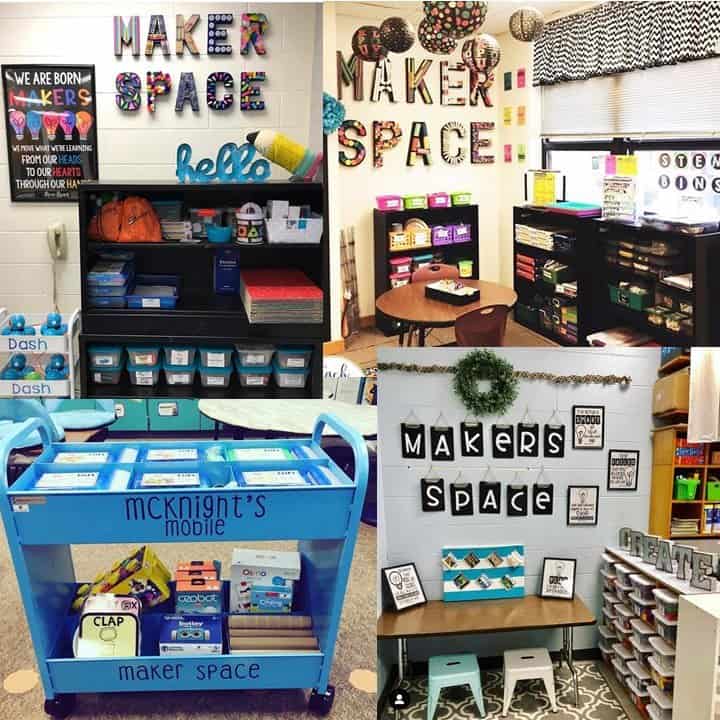
Image result for complex classroom maker spaceImage result for complex classroom maker space

According to Makerspace for Education.com, Makerspace is a place where young people have an opportunity to explore their own interests; learn to use tools and materials, both physical and virtual; and develop creative projects" (citation). Makerspace in a classroom can be a section of a room or even a movable cart. Makerspace really focuses on the ideas of constructionism and constructivism coming from the work of Seymour Papert. Constructivism is the theory of learning based on experience and observation. Through experience and reflecting on your experiences individuals construct their own knowledge and understand the world around them. (Roffey).

A makerspace can be as simple or complex as desired. In my research, I found examples of a very complex set up and then ones that were on rolling carts. While each looked physically different they all achieved the same goal. They gave students an opportunity to tinker and build create using their own imagination.


Image result for classroom maker space

Possible supplies for a Makerspace.
*Cardboard
*empty container
*glue
*bottle caps
*pens/pencils

Taking this into account I found myself wondering how to apply makerspace ideas into preschool and even toddler classrooms. How can I set up a section of our classroom that allows 3-4-year-olds to explore materials in a makerspace like space? I think the key to this is to start with the idea of tinkering. In addition to providing a space to tinker, makerspace would also provide an opportunity for the kids to collaborate with each other to create projects.  According to learningchildblog.com if young children have a makerspace there are key responsibilities and roles for the teachers.
- Helping children to problem-solving by asking open-ended questions
- Give plenty of time to design, build, and test
- Help children fix mistakes without taking over their project


Roffey, T. (n.d.). Makerspace for Education. Retrieved February 13, 2020, from http://www.makerspaceforeducation.com

(2017, September 11). Retrieved from https://learningchildblog.com/2017/09/11/makerspaces-in-early-childhood-settings/

Roffey, T., Sverko, C., & Therien, J. (2016, April 3). Makerspace: Curriculum Guide. Retrieved February 13, 2020, from http://www.makerspaceforeducation.com/uploads/4/1/6/4/41640463/makerspace_for_education_curriculum_guide.pdf


Thursday, February 6, 2020

Week 3- Genius Hour

Imagine walking into a classroom that allows students to explore their own passions and encourages creativity what would that look like. How would the classroom function and what would the daily schedule look like?
These are all great questions that you might find yourself asking about Genius Hour. According to GeniusHour.com this pedagogy provides students a choice in what they learn during a set period of time during school. Genius Hour is based on the principle Google uses that focuses on when people work on something that interested them productivity goes up. This same theory can be applied to education.
The same theory Google uses can be applied to education by setting a certain amount of time for students to do a project that interests them. The students then spend several weeks researching the topic and create a final project that is shared with their classmates. Deadlines are limited and creativity is encouraged.
According to Edutopia.org there are six basic tenets of personalized instruction.
1. Dude teacher role- It is important for teachers to monitor students progress of projects to ensure they are staying focused.
2. Learn about your students- Using Genius Hour will allow you to learn more about your students personality and their learning styles.
3. Create a culture of collaboration- Genius Hour allows students the opportunity to work alone or in groups
4. Create an interactive learning environment- Students work to create a presentation to present to the rest of the class.
5. Build flexible pacing, but with structure- Less structure as a teacher which allows students to be more independent
6. Create authentic Assessments- Reflections throughout project.

This video is an example of how Genius Hour is used in a 4th grade classroom.

Carter, N. (2014, August 4). Genius Hour and the 6 Essentials of Personalized Education . Retrieved February 6, 2020, from https://www.edutopia.org/blog/genius-hour-essentials-personalized-education-nichole-carter

Genius Hour- Example of Personalized Learning in Action . (2017, December 17). Retrieved February 6, 2020, from https://www.youtube.com/watch?v=tiy0uzka1ds

What is Genius Hour? . (n.d.). Retrieved February 6, 2020, from http://geniushour.com/what-is-genius-hour/